
Glove Intelligent Assistant
10.02.2026
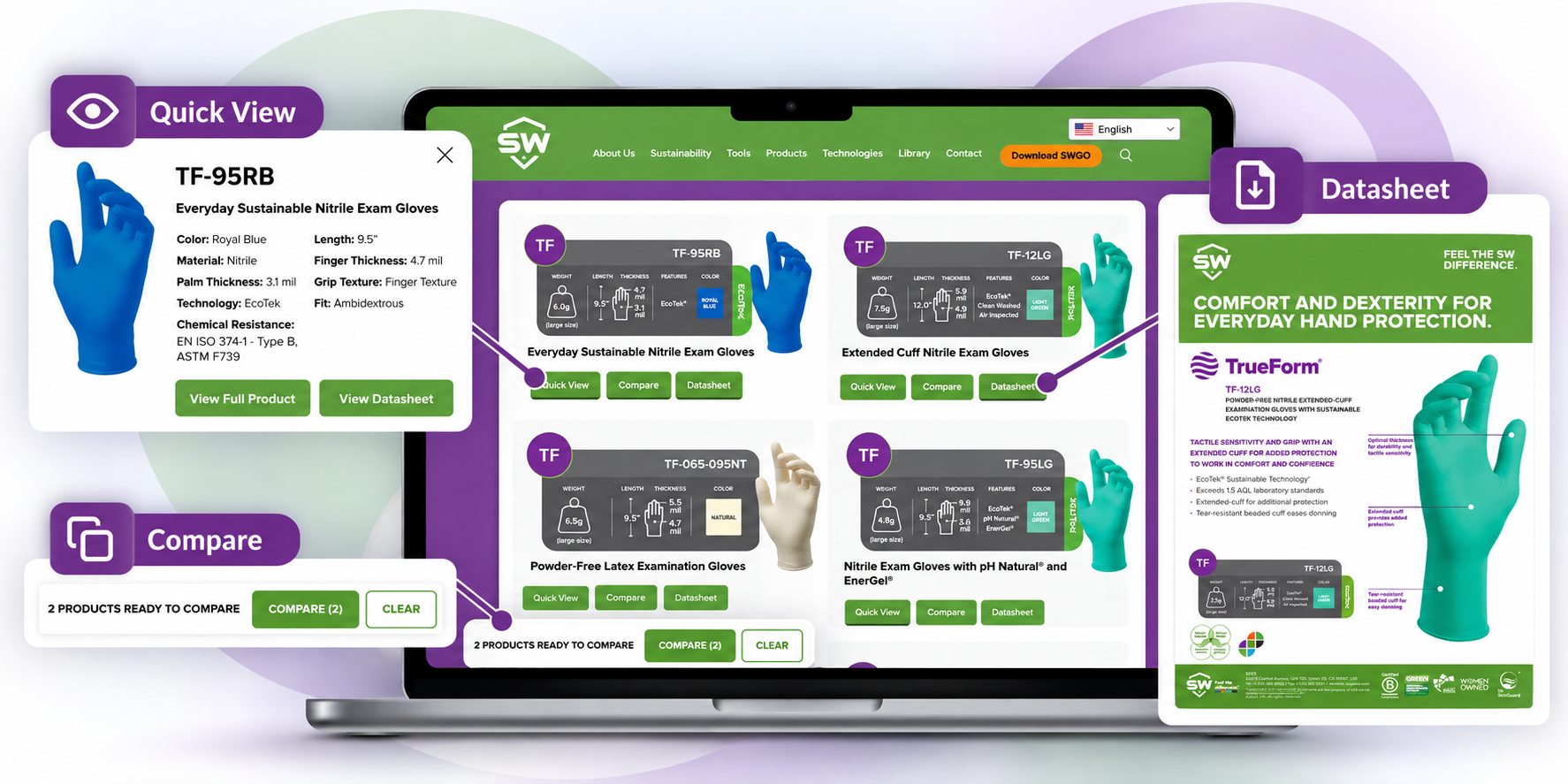
Finding a potential glove is one thing. Getting the information you need to evaluate it is another.
An end user may want to check specifications before requesting a sample. A distributor sales representative may need to compare two options while talking with a customer. Procurement may need a datasheet or a broader view of available products.
SW’s website is designed to make those next steps easier, with digital features that help users move from product discovery to product information without unnecessary searching.
If you know the application but not the product, Glove Finder can help create a starting point.
Instead of beginning with the entire SW portfolio, users can narrow their search based on their needs and identify products worth exploring further.
From there, the website provides several ways to dig deeper depending on what information you need next.
Not every product needs a deep dive.
Quick View lets you check key product information while browsing, helping you determine whether an option is relevant before opening the full product page.
For distributor sales representatives, that can be especially useful during customer conversations. Rather than navigating through multiple pages, you can quickly check the product and decide whether it makes sense to explore further.
For end users and procurement teams, it provides a simple way to screen potential options during initial research.
Once you’ve narrowed the choices, the question often changes from “What products are available?” to “How are these products different?”
SW’s Compare feature allows you to place products side by side and review their information together.
That makes it easier to evaluate potential options in context rather than moving back and forth between individual product pages. It can also help distributor representatives walk customers through alternatives while keeping the discussion focused on the needs of the application.
Individual SW product pages provide direct access to product datasheets, so technical information can be downloaded and shared for further evaluation. Users looking for a broader view of SW hand protection can also access the SW product catalog directly from the website.
Whether information needs to be reviewed internally, shared with a customer, or used as part of a purchasing evaluation, it’s available without having to request it separately.
Technology That Makes the Process Easier
Digital tools are most valuable when they remove steps rather than create more of them.
That’s the thinking behind features like Glove Finder, Quick View, Compare, direct datasheet access, and the online catalog. Each supports a different point in the product research process—from discovering potential options to reviewing and sharing the information behind them.
For end users, that can mean a more straightforward path to evaluating hand protection. For procurement, it can simplify product research and information gathering. And for distributor sales representatives, it can make it easier to answer questions and keep customer conversations moving.
Technology doesn’t replace hand protection expertise. It makes that expertise and product information easier to access when it matters.
Explore SW Products